

Microsoft Teams Rooms Explained: A Complete Guide to Modern Meeting Spaces
Microsoft As hybrid and flexible work become standard across organizations, meeting rooms are evolving from simple spaces with screens and conference phones into intelligent collaboration environments. Businesses need meeting technology that is easy for employees to use, simple for IT teams to manage, and consistent across offices and room types.
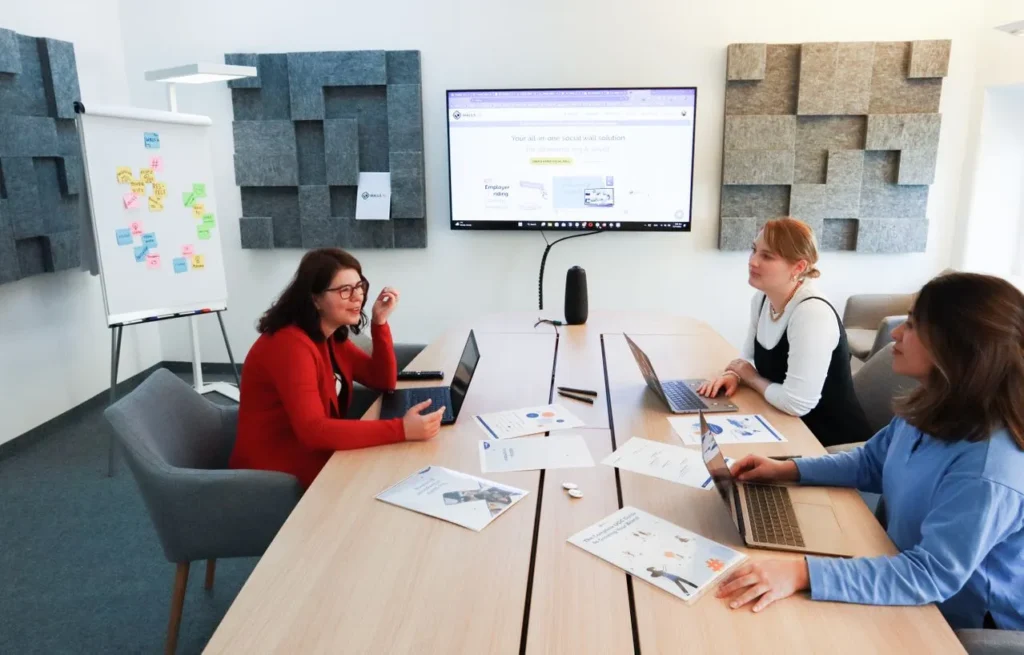
Microsoft Teams Rooms has emerged as a popular solution by bringing the familiar Microsoft Teams meeting experience directly into physical meeting spaces. Instead of asking users to connect laptops, cameras, microphones, and displays manually, Teams Rooms combines these elements into an integrated room system designed for seamless collaboration.
But what exactly is a Microsoft Teams Room, how does it work, and what should organizations consider before deploying one?
This guide explores the fundamentals of Microsoft Teams Rooms, including hardware, operating systems, licensing, room design, audio and video considerations, management, security, and deployment planning.
What Are Microsoft Teams Rooms?
Microsoft Teams Rooms is a dedicated meeting room system that brings Microsoft Teams into a physical conference or collaboration space.
Rather than relying on individual participants to connect their own devices and peripherals, a Teams Room runs Microsoft Teams on dedicated, certified hardware. Users can walk into a room, tap the meeting on the room console, and start collaborating with minimal setup.
A typical Microsoft Teams Rooms deployment includes several core components:
- A Windows- or Android-based compute platform
- A touch console for controlling meetings
- Certified cameras, microphones, and speakers
- One or two displays at the front of the room
- A Microsoft Teams Rooms license
Depending on the room and hardware selected, several of these components can be combined into an all-in-one device. Video bars, for example, may integrate the compute platform, camera, microphones, and speakers into a single unit.
The primary goal is consistency. Employees should be able to enter different meeting rooms and immediately understand how to join meetings, share content, adjust settings, and collaborate with remote participants.
Why Organizations Choose Teams Rooms
One of the biggest advantages of Teams Rooms is the ability to standardize the meeting experience across an organization.
Users can join meetings with a single tap, while IT teams can manage room devices and policies through Microsoft’s broader management ecosystem.
Teams Rooms also benefits from Microsoft’s certified device ecosystem. Certified hardware is tested for compatibility and performance with Teams, helping organizations build reliable room configurations.
Microsoft is also adding more AI-powered capabilities to its collaboration platform. Features such as IntelliFrame and Facilitator AI are designed to improve the experience for both remote and in-room participants.
As AI becomes increasingly integrated into workplace collaboration, organizations should consider not only today’s requirements but also how their room infrastructure can support future capabilities.
Windows vs. Android Microsoft Teams Rooms
Microsoft Teams Rooms can run on either Windows or Android, with each approach offering different benefits depending on the room environment and organization’s requirements.
Windows-Based Teams Rooms
Windows-based systems are often suited to environments that require greater flexibility and customization.
They can be a strong choice for:
- Complex meeting rooms
- Training and learning spaces
- Modular hardware configurations
- Advanced integrations
- Specialized room environments
- Broader peripheral compatibility
Organizations with demanding room configurations may prefer Windows because of the additional flexibility it can provide.
Android-Based Teams Rooms
Android-based Teams Rooms typically focus on streamlined deployment and simplified management.
They can offer:
- Faster deployment
- Simplified administration
- Consistent configurations across rooms
- Reduced maintenance requirements
- Support for Microsoft’s Device Ecosystem Platform (MDEP) on compatible devices
For organizations deploying Teams Rooms across many similar meeting spaces, Android-based solutions can simplify standardization and ongoing management.
Understanding MDEP
The Microsoft Device Ecosystem Platform (MDEP) is Microsoft’s enterprise Android platform for shared devices.
On compatible Teams Rooms devices, MDEP provides a common foundation for areas such as device management, security updates, application deployment, and lifecycle management.
However, not every Android-based Teams Rooms device uses MDEP, so organizations should evaluate the specific platform and device certification before making a purchasing decision.
Ultimately, the choice between Windows and Android should be based on the actual requirements of each room rather than assuming one platform is universally better.
Microsoft Teams Rooms Licensing Explained
Licensing is another important part of a Teams Rooms deployment.
Teams Rooms Basic
Teams Rooms Basic provides core meeting room functionality, including:
- Meeting participation
- Scheduling
- One-touch meeting join
- Content sharing
- Basic device management
The Basic license is available for up to 25 Teams Rooms per tenant.
Teams Rooms Pro
Teams Rooms Pro is designed for organizations that need more advanced capabilities and centralized management.
It includes features such as:
- Advanced meeting experiences
- Front Row
- Centralized device management
- Room analytics
- Remote monitoring
- Policy management
- Additional advanced meeting capabilities
For organizations managing a large number of meeting rooms, Teams Rooms Pro can provide the tools needed to monitor room health, manage devices, and maintain consistent configurations.
The availability of specific AI-powered features may depend on hardware, licensing, Microsoft Teams Premium, Microsoft 365 Copilot, administrative settings, and regional availability.
Designing Teams Rooms for Different Spaces
The right technology depends heavily on the physical room.
Small Meeting Rooms
Small rooms and huddle spaces typically benefit from simple configurations, such as:
- Integrated video bars
- A single display
- Compact microphone and speaker systems
- Simplified room controls
The goal is to provide full meeting functionality without adding unnecessary complexity.
Medium Meeting Rooms
Medium-sized rooms may require:
- Single or dual displays
- Additional microphones
- Wider camera coverage
- Front Row layouts
- More flexible audio configurations
These rooms often need to accommodate both in-person collaboration and larger numbers of remote participants.
Large Rooms and Boardrooms
Large conference rooms and boardrooms generally require more sophisticated systems, including:
- Modular audio and video components
- Multiple microphones
- Dual displays
- Expanded camera coverage
- More powerful room control systems
Room size, seating arrangement, acoustics, lighting, and participant behavior should all be considered during system design.
Audio and Video Best Practices
A successful meeting room is ultimately measured by how easily people can communicate.
For audio, organizations should prioritize:
- Clear speech pickup throughout the room
- Consistent volume levels
- Minimal echo and background noise
- Effective reverberation control
- Strong voice isolation
For video, cameras should provide a natural field of view and frame participants clearly. Whenever possible, camera placement should support natural eye contact rather than forcing participants to look significantly above or below the display.
Microsoft Teams also uses AI-powered audio technologies such as echo cancellation, dereverberation, and voice isolation to improve speech quality.
However, technology cannot completely compensate for poor room design. Acoustics, microphone placement, furniture, room size, and background noise can all affect meeting quality.
Common Meeting Room Mistakes
Organizations should avoid:
- Poorly treated acoustics
- Cameras positioned too far from participants
- Displays mounted excessively high
- Complicated cable-based content sharing
- Limited options for guests and external participants
If users consistently struggle to hear or see one another, meeting room adoption can suffer regardless of how advanced the underlying technology is.
Managing and Securing Teams Rooms
As organizations move from a handful of rooms to dozens or hundreds, centralized management becomes increasingly important.
Teams Rooms Pro provides tools for monitoring device health, managing updates, tracking room usage, and troubleshooting problems remotely.
Using Microsoft-certified hardware can also help organizations maintain compatibility and consistency across deployments.
Security should be considered throughout the room lifecycle. Organizations should evaluate:
- Encryption for meetings and shared content
- Security updates
- Compliance requirements
- Administrative policies
- Identity and access controls
- Microsoft 365 integration
A well-managed room environment reduces operational complexity while helping IT teams identify and resolve problems before they disrupt important meetings.
Planning a Microsoft Teams Rooms Deployment
Before selecting equipment, organizations should first understand how their meeting spaces are actually used.
Key questions include:
- Who uses the rooms most frequently?
- How often do meetings include external guests?
- Do employees need BYOD capabilities?
- Are other meeting platforms required?
- Which rooms need advanced audio and video capabilities?
- How will devices be monitored and supported?
A pilot deployment can be particularly useful. Organizations can test different combinations of Windows and Android systems, video bars, modular configurations, displays, and peripherals before establishing company-wide standards.
Success can then be measured through factors such as meeting start times, user satisfaction, support requests, room utilization, and device reliability.
The Future of Modern Meeting Rooms
Microsoft Teams Rooms provides organizations with a way to standardize collaboration while reducing the friction traditionally associated with conference room technology.
Whether a business chooses Windows or Android, an all-in-one video bar or a modular system, the most successful deployments begin with the same principle: technology should adapt to the way people work, not the other way around.
Organizations should also consider how employees collaborate beyond traditional Teams meetings. Wireless presentation, guest access, BYOD, and cross-platform collaboration are increasingly important as workplaces become more flexible.
Solutions such as Barco ClickShare can complement Microsoft Teams Rooms by adding wireless presentation and BYOD capabilities while helping organizations maintain a consistent and manageable meeting room experience.
Ultimately, the best Teams Rooms strategy combines the right technology with thoughtful room design, centralized management, strong security, and a clear understanding of how employees and guests actually collaborate. That approach can turn meeting rooms from technology-heavy spaces into simple, reliable environments where people can focus on the conversation rather than the equipment.
Source Link: https://www.barco.com/